
Documents and indexing
The Documents area is the source library for a workspace. It combines file management with the indexing controls that make content available to research.
Add and organize files
Section titled “Add and organize files”- Open your workspace and select Documents.
- Select Upload → Upload files and choose files from your computer. Use Upload folder to bring in a folder structure, or drag files and folders into the document area.
- Check the upload result for skipped or rejected files. Supported files appear as Queued.
- Select Continue indexing to process the queued files when no indexing job is running.
- Wait for Completed before using a file in research.
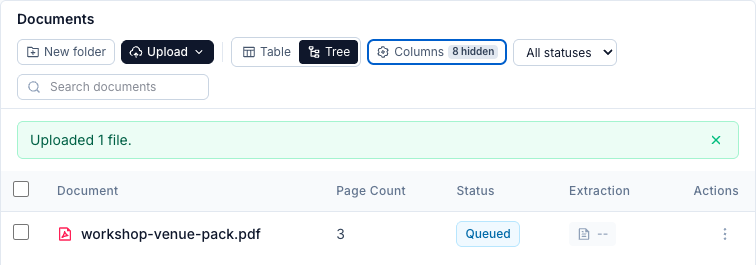
Use Continue indexing in the status bar above the document list to start processing.
Select New folder, enter a Folder name, and select Create to organize the collection. Use a file’s File actions menu for Move or Rename. The library provides table and tree views for collections of different sizes.
Use search, sorting, and status filters to find a file or monitor a large ingestion job. The table view can show file type, page count, size, status, progress, extraction method, chunk count, and quality information. Open Columns to choose which details are visible. The screenshot shows Document, Page Count, Status, Extraction, and Actions; other columns are hidden to keep the view compact.
Understand indexing status
Section titled “Understand indexing status”| Status | Meaning | Available to research? |
|---|---|---|
| Queued | Waiting for an indexing worker | No |
| Processing | Content is being extracted or indexed | No |
| Completed | Indexing finished successfully | Yes, when enabled |
| Failed | Processing did not complete | No |
| Canceled | The indexing job was stopped | No |
| Unsupported | The file type cannot be indexed | No |
You can monitor active and previous jobs, cancel an active job, and reindex after changing the source or extraction settings.
Change one document’s extraction method
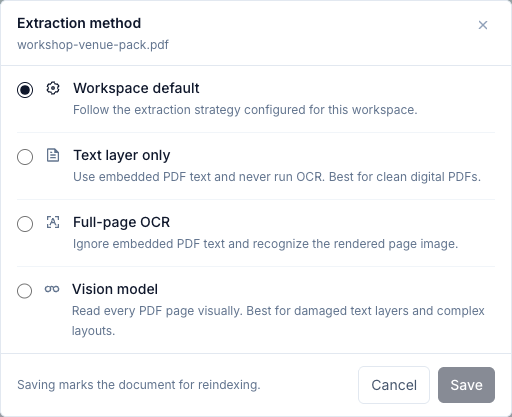
Section titled “Change one document’s extraction method”Open the three-dot File actions menu at the end of a PDF’s row, then select Extraction method… to choose how its content is read.
| Option | Use it when |
|---|---|
| Workspace default | The file should follow the strategy selected in workspace settings. |
| Text layer only | A digital PDF has clean embedded text and does not need OCR. |
| Full-page OCR | The PDF consists of scanned pages or has a broken text layer. |
| Vision model | Complex visual structure needs a page-level reading approach. |
Select Save, then use File actions → Reindex to apply the method to an existing document. Wait for Completed and inspect the result before researching it again. More intensive extraction can help difficult pages, but takes more compute and time.
For the workspace-wide Adaptive strategy, quality threshold, tables, formulas, and picture options, see workspace settings.
Enable or disable a document
Section titled “Enable or disable a document”Open File actions → Disable to remove a document from the searchable collection without deleting it. Use this when a source should remain in the workspace but must not influence current research.
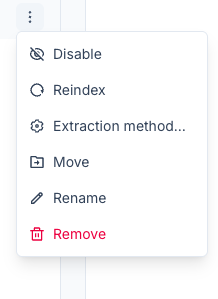
Select File actions → Enable to return it to the collection once its indexing is complete. This changes what future research can retrieve; it does not rewrite answers already saved in a conversation.
Inspect the result
Section titled “Inspect the result”Open a document to compare the source preview with its indexed Markdown. The analysis view can show page coverage, chunks, embedding coverage, and quality information while keeping the source and extracted content aligned.
Users with the required permission can correct a specific indexed Markdown chunk. Reindexing may replace manual chunk edits, so prefer correcting the source file when possible.
Quality checklist
Section titled “Quality checklist”Before starting high-impact research:
- Confirm all required documents show Completed.
- Confirm those documents are enabled.
- Spot-check scanned pages, dense tables, formulas, and images.
- Compare important extracted passages with the original source.
- Reprocess low-quality documents with a more suitable extraction method.
Troubleshoot a missing source
Section titled “Troubleshoot a missing source”| What you see | What to check |
|---|---|
| A file stays queued | If there is no active job, select Continue indexing. If a job starts but nothing progresses, ask the administrator to check extraction and embedding services. |
| A file fails | Read its error, check that the original opens correctly, then retry after fixing the cause. |
| Text is missing or garbled | Inspect the original and extracted content; try OCR for scans or a different extraction method for difficult PDFs. |
| A completed file is ignored in research | Confirm it is enabled, check the active workspace, and ask a focused question that names the file. |
| A source preview differs from indexed text | Reindex the affected document and wait for completion before checking again. |