
Organizations and collaboration
Organizations group users and team-owned workspaces under shared management.
Roles and permissions
Section titled “Roles and permissions”Access combines platform, organization, and workspace roles. Regular users work within their permitted scopes. Platform administrators may also have user-management, audit, telemetry, license, and deployment-wide controls.
Organization roles
Section titled “Organization roles”| Role | Organization management | Organization workspaces |
|---|---|---|
| Owner | Manage settings, members, and ownership | Ownership-level management |
| Admin | Manage settings and members | Ownership-level management |
| Member | No organization administration | View and research by default |
The final owner cannot be removed or changed to another role until another owner exists.
Invite organization members
Section titled “Invite organization members”Organization owners and admins can invite a user by email and assign an organization role. The exact onboarding flow depends on email and account provisioning for the deployment.
Organization membership grants member-level view and research access across the organization’s workspaces. Assign a separate workspace role when the user needs additional management capabilities in one workspace.
Workspace roles
Section titled “Workspace roles”- Workspace Member can view the workspace and conduct permitted research.
- Workspace Manager can manage documents, settings, and members.
Organization owners and admins receive ownership-level capabilities for organization workspaces through their organization role.
Share a personal workspace
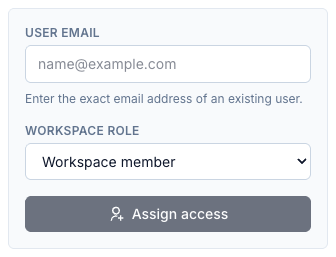
Section titled “Share a personal workspace”- Open the workspace and select Settings → Members.
- Enter the existing user’s exact address in User email.
- Choose Workspace member or Workspace manager under Workspace role.
- Select Assign access.
Shared workspaces appear in the recipient’s personal scope. The form grants access to an existing account; it does not create a new account.
Keep access intentional
Section titled “Keep access intentional”- Put team-owned collections in an organization workspace.
- Grant the lowest role that supports the person’s work.
- Review organization membership separately from workspace assignments.
- Remove access when it is no longer needed.
- Confirm the active scope before creating a workspace or uploading files.
To manage access to one workspace, open its Settings → Members. Review organization membership separately: organization members can already have access without a separate workspace assignment.