
Workspaces
A workspace is the boundary around a document collection and its research. It contains documents, conversations, working documents, members, and research settings.
Personal and organization workspaces
Section titled “Personal and organization workspaces”- Personal workspaces belong to one user and can be shared with existing users.
- Organization workspaces belong to an organization and follow its membership and permissions.
The workspace directory shows useful context such as document and conversation counts, your role, recent activity, and indexing status.
Write a useful description
Section titled “Write a useful description”To create a workspace, open Workspaces → Create workspace, enter its name and description, and select Create workspace. To change these later, open the workspace’s Settings → Info and select Save workspace details after editing.
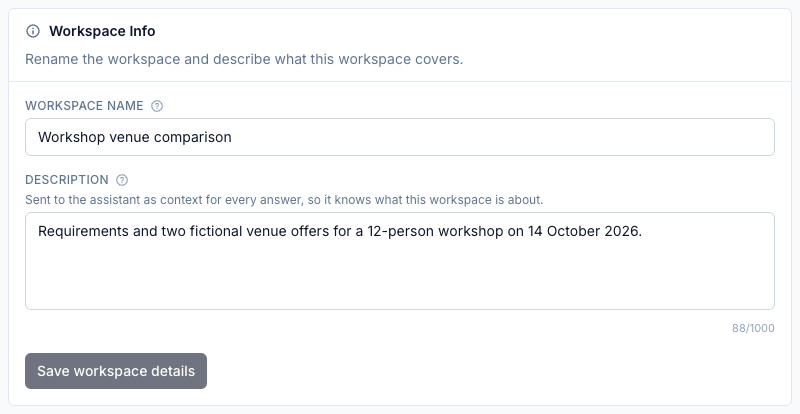
The workspace description is supplied to the research assistant with every answer. Keep it short and factual. Include information that helps disambiguate the corpus:
- the project, case, or subject;
- the intended audience or decision;
- important terminology or abbreviations;
- the time period or jurisdiction when relevant.
Avoid putting confidential material in the description unless every workspace member is allowed to see it. Put detailed output-format or behavior instructions in the assistant settings.
Areas inside a workspace
Section titled “Areas inside a workspace”- Research contains conversations and their working documents.
- Documents contains the source library, folder structure, and indexing activity.
- Settings contains the workspace profile, assistant behavior, indexing controls, members, and management actions available to your role.
Use the workspace settings guide to understand each assistant and indexing option, its tradeoffs, and whether existing documents need reindexing.
Share or transfer a workspace
Section titled “Share or transfer a workspace”Workspace managers can assign Workspace Member or Workspace Manager access. Personal workspaces can be shared with an existing user by exact email address.
A personal workspace can be transferred to an organization when team ownership is required. Treat this as an ownership change: review the destination organization’s membership and policy first.
Delete a workspace
Section titled “Delete a workspace”Deletion removes the workspace and its stored data, including source documents, conversations, working documents, indexing records, and objects in storage.